타입 위스퍼로 🎙️
My hands can’t keep up with speech.
As of 2010, ten thousand people who posted a score on Hancom Typing (한컴타자연습) averaged 300타 (keystrokes) a minute. When a Korean talks freely, speech runs past 400 characters a minute. 300타 is not 300 characters. Hangul takes two or three keystrokes per character. In characters, that’s 100 to 150 a minute. So speech is nearly four times faster than hands.
So I started using an STT (speech-to-text) app. Cursor, ChatGPT, and Claude were not the reason. Those apps have their own dictation, and it’s better. It only works inside that window, though. Mail, notes, the browser. I wanted it anywhere text goes.
At first I used TypeWhisper. It’s a good app. Well known, too. Words you put in the dictionary get written down right, and a phrase you correct once comes out that way next time.
But Korean kept failing.
It fails if the ending sticks on
I registered 타입 위스퍼 in the dictionary so it would be corrected to TypeWhisper. Say only that word and it works. But if I say 타입 위스퍼로 (TypeWhisper with 로 stuck on the end), it should come out as TypeWhisper로. What came out was,
타입 위스퍼로
English writes “on GitHub” as two words. Korean writes GitHub에 as one word. A short ending, a particle, glues onto the word, and there is no space.1 That’s why it fails. The dictionary has 타입 위스퍼. The engine heard 타입 위스퍼로. The app treats the two as different words.
You’d think registering each ending would do it. 타입 위스퍼로, 타입 위스퍼에서, 타입 위스퍼로는 … Putting every ending that can stick to one word into the dictionary is close to impossible.
So I made an STT app only for Korean.
bdsk registers the word only. Put in 깃허브 (GitHub, said in Korean) and you get GitHub에, GitHub에서, GitHub로는. It also leaves on endings that aren’t particles but stick right on, like 입니다, 이에요, and 이니까 (formal “is”, polite “is”, “because it is”). Put in 메이슨 (Mason) and you get 안녕하세요 Mason입니다 (Hello, this is Mason).
It doesn’t cut off all the Hangul that follows. If what comes next isn’t on the list, like the 링 in 스위프트 데이터링 (Swift Data with a trailing 링), it leaves it as is.
I put GitHub, Notion, and PR in the dictionary on both TypeWhisper and bdsk and tried them. Say the word alone and both correct it. Say it in a sentence and only bdsk changes it correctly.
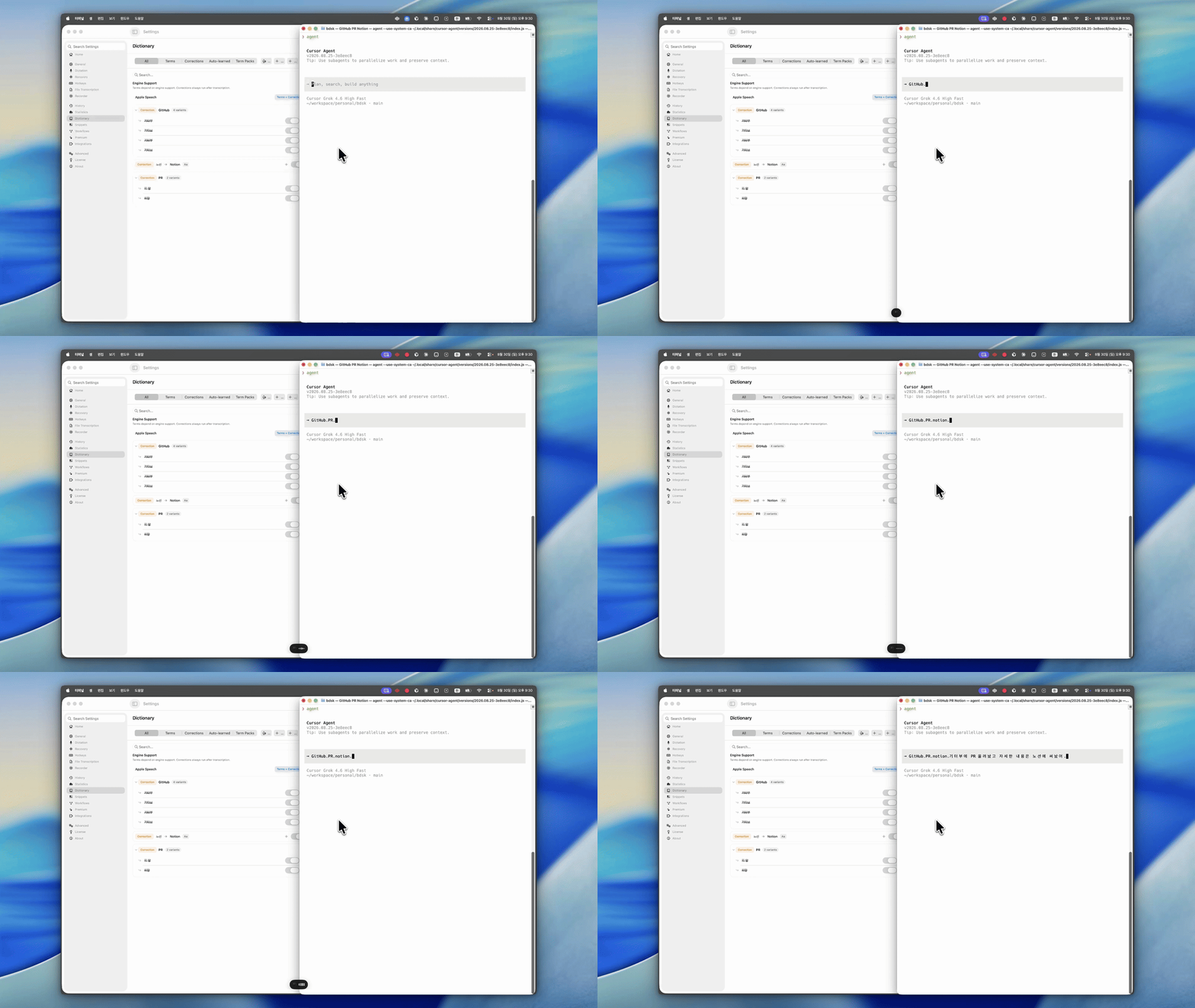
TypeWhisper. 기터부에 PR 올려놨고 자세한 내용은 노션에 써놨어. (I put the PR up and wrote the details in Notion. It heard 기터부 and 노션.)
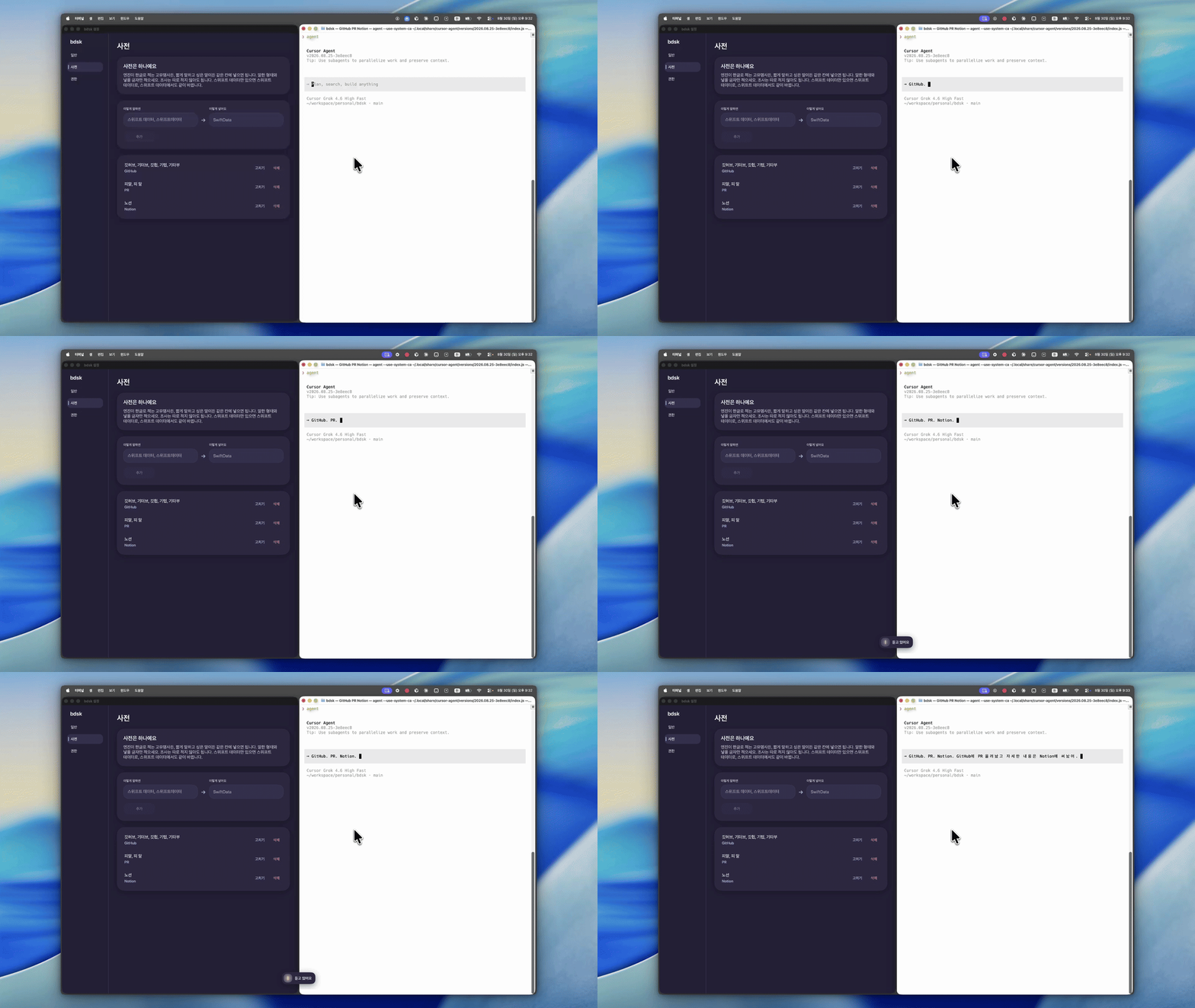
bdsk. GitHub에 PR 올려놨고 자세한 내용은 Notion에 써놨어. (the same sentence, with GitHub and Notion.)
Speed matters most
TypeWhisper lets you pick a model.
If the computer is good, use a local model. If not, an API works too. My Mac isn’t that good, and I wasn’t going to pay for dictation. So it had to be a local model.
I thought speed mattered most. So I tried several models.
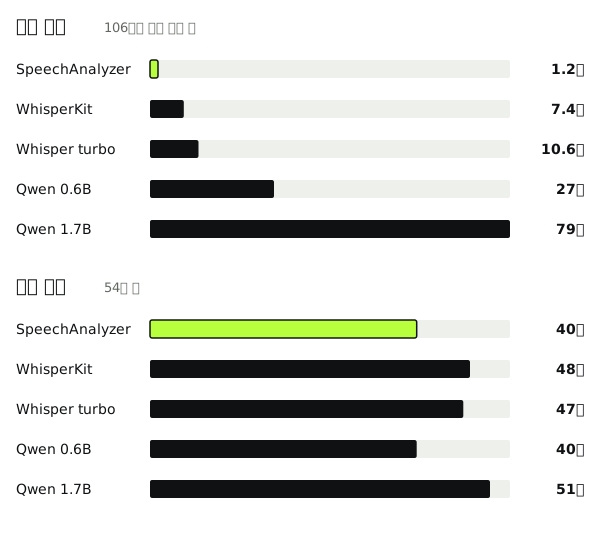
Everyday life, a business trip, management, investing, development, product. I recorded six sentences with Korean and English mixed. Together, 106 seconds. 54 names to get right. I ran it on an M3 Pro.
Apple SpeechAnalyzer is the dictation that exists from macOS Tahoe, that is, 26. Whisper turbo seemed to be the model most widely used for dictation. I tested five models in all.
SpeechAnalyzer finished in 1.2 seconds. That isn’t time I waited while talking. After warmup, it’s how long the 106-second recording took to transcribe from a file. Hard to believe, right? I hear it’s fast because it runs on the Neural Engine. It got 40 of the 54 names. Qwen 1.7B got 51, and took 79 seconds. The same recording on WhisperKit was 7.4 seconds, 48 names.
What SpeechAnalyzer missed were short English abbreviations. Things like CAC, CTA, FAB. SpeechAnalyzer heard term sheet as 팀 시트 (a phonetic miss) too, and so did Qwen and Whisper. Either way, the dictionary can fix it.
Dictation has to turn into text right after you speak. A wrong name can be fixed in the dictionary. 79 seconds, I can’t wait. I kept only Apple SpeechAnalyzer.
The problem is Sonoma. That version has no SpeechAnalyzer. Instead there’s SFSpeechRecognizer, which has been around. I tried it, and it wasn’t bad. Right now I use SpeechAnalyzer on Tahoe, and SFSpeechRecognizer from macOS 14.
한 분 and 1분
하나, 둘, 셋 (one, two, three). 1, 2, 3. Both are numbers, but the engine sometimes mixes them when it writes them down. 한 시에서 두 시 사이에 전화할게 (I’ll call between one o’clock and two) comes out as 1시에서 2시. 한 분 (one person) and 1분 (one minute) don’t mean the same thing.
Neither 1시에서 2시 사이에 전화할게 nor 한 시에서 두 시 사이에 전화할게 is a wrong sentence. So the app doesn’t decide. You pick. When a unit like 시 (o’clock), 분 (minute), or 개 (how many things) is attached, it doesn’t insert right away. You choose in a small window, then it goes in. Whenever that unit shows up, it asks every time. It does not remember what you picked last time.
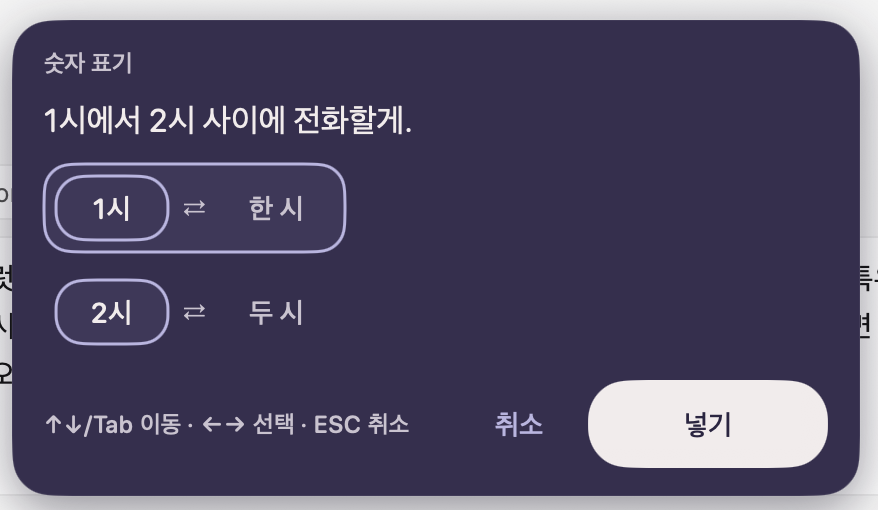
Up and down, or Tab, moves between them. Left and right arrows pick 1시 or 한 시.
I made the first version in an evening and uploaded 1.0.0 that day. Include the model comparison from the night before and it’s about seven and a half hours.
A world where anyone can make an app has really arrived.
The install file is on GitHub.
Footnotes
-
These endings are called particles. 은 and 는 mark the topic, 이 and 가 the subject. 에, 에서, and 로 are closer to place or direction, and none of them is one English preposition. The title,
타입 위스퍼로, is TypeWhisper plus 로. ↩